2

Week Design Sprint

3

Coding languages

4

Users tested

Ai-assisted, award-winning design, hand-coded

Ai-assisted, award-winning design, hand-coded

Bonsai Collective

Social media app for Bonsai enthusiasts

I enrolled in ADPList's "Design with AI" course to learn how to use AI in my workflow.

After fulfilling the goals of the course and being selected to present my work to the international design community, I continued to refine the project and iterate based on user testing. I took the opportunity to learn HTML, CSS, and JavaScript, rather than rely on AI coding tools, so that I would learn Front End development "under the hood".

Team

Senior UI / UX Designer (me), Ai Prompt Engineer (me), FE developer (me)

UI / UX Design Market Research Frond-end Dev

Platforms

Web / Android

Tools

Copy.ai Writesonic 10Web.io Deep Dream Generator Figma

Figjam GitHub VScode

Outcomes

Ai-assisted design concept, successful design (finalist), coded app for mobile web

Challenges:

Use 2 design sprints to create a social media / networking app for Bonsai fans.

Completing the course required us to use AI tools for all manner of design work. We were tasked with naming, adding content, and creating a coherent product idea in a 2-week period of time.

Goals:

Present the project to the international design community, iterate the design based on user testing and code the app.

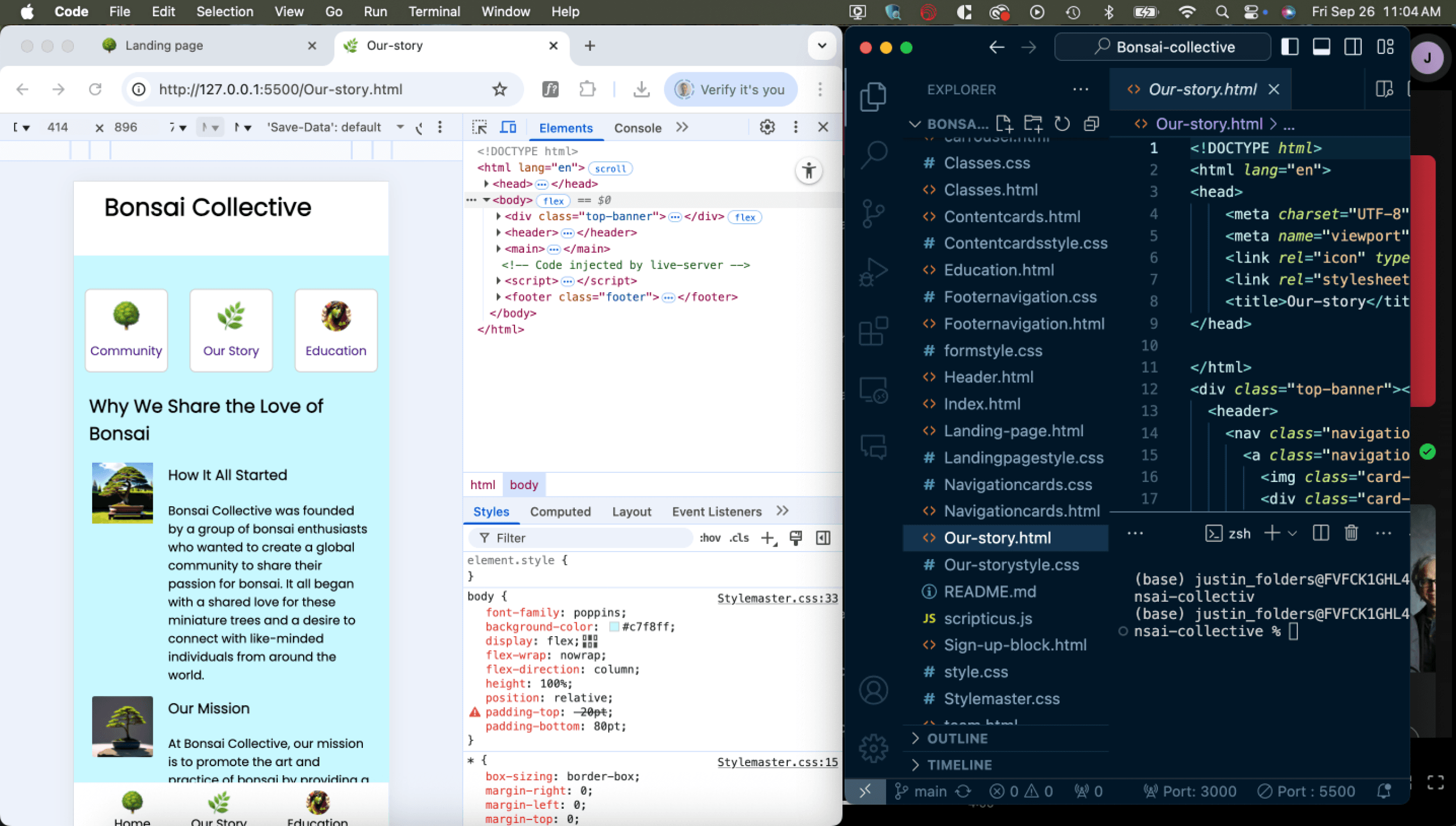
The initial goal was achieved by leveraging several AI tools, for copy, content, and wireframes. Once this was done and the class completed, I tested the mid-fidelity mocks on users and iterated, while learning to code.

This involved:

  • Using a combination of AI tools and Figjam to create the class presentation.

  • Recruiting 4 users from the ages of 30 - 70 to test the design.

  • Learning HTML, CSS, and JavaScript.

  • Setting up a Github repository and using VS Code (no AI-assistant though!).

Solutions:

Hand-coded app for web, iterated based on user testing.

User feedback was unanimous on some limitations of the initial design. While I'd used the initial design as a template for my coding education, I iterated the final product, directly in code, based on the feedback

Testing results:

  • UI seems clear and pleasant.

  • Participants were confused about what the signup was for.

  • 1 user unsure about the value proposition of the product (would it matter to users)?

  • participants were split looking for information about the product on either "Our story" page or the "Meet the team" page.

  • Onboarding had a 100% success rate.

  • 3/4 expected system confirmation of success.

Design highlights:
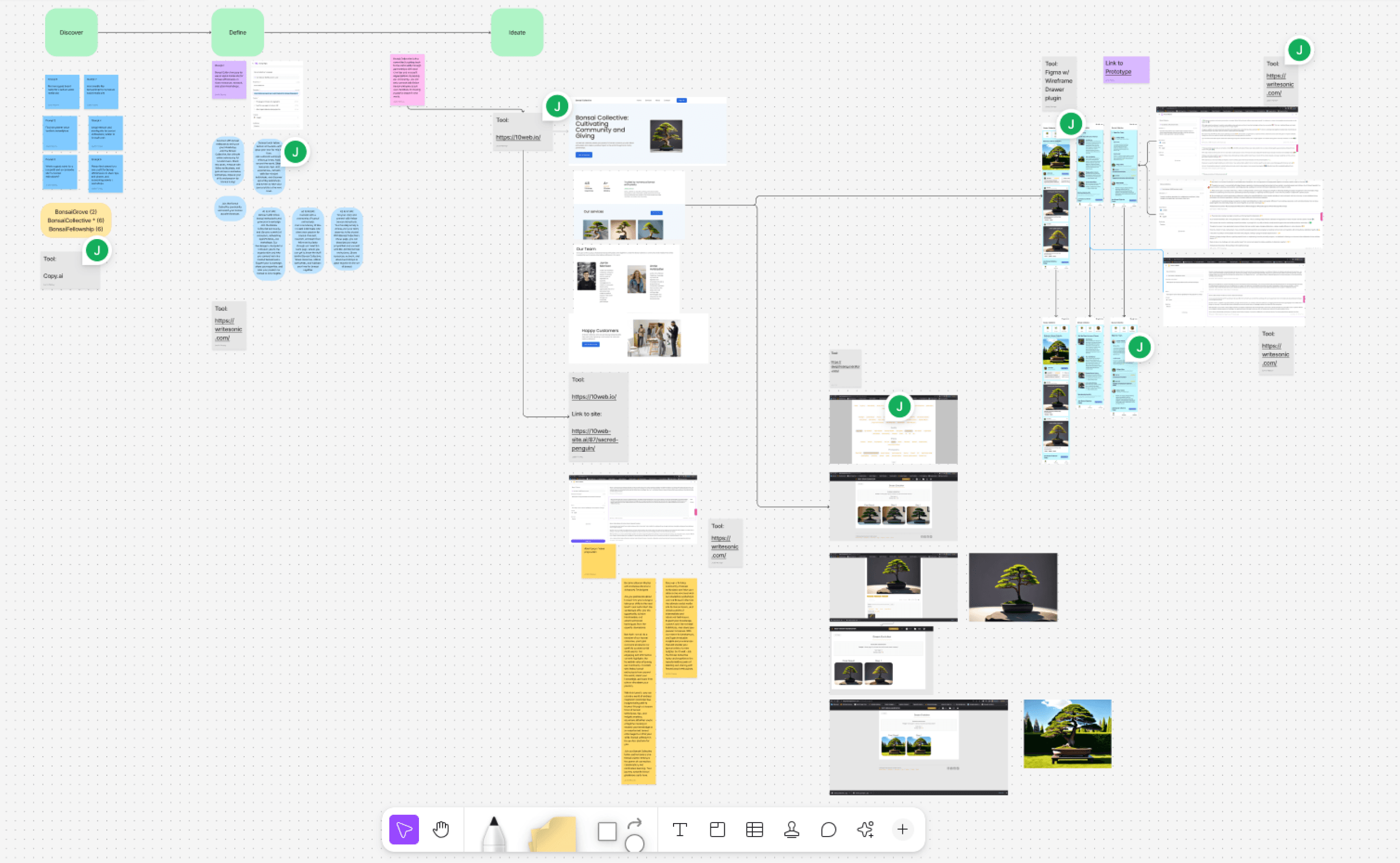
The class presentation Figjam

The class presentation Figjam

Ai-assisted rapid design workflow

Ai-assisted rapid design workflow

  • For the class project, I used copy.ai for the name, 10web.io for the body copy, deep dream for images, and Figma's AI plugin for the wireframes.

  • The flow was POC and well-received by the instructors of the class. It was selected as one of the 5 finalist projects to be presented.

  • I converted the wireframes to mid-fidelity prototypes for user testing.

  • For the class project, I used copy.ai for the name, 10web.io for the body copy, deep dream for images, and Figma's AI plugin for the wireframes.

  • The flow was POC and well-received by the instructors of the class. It was selected as one of the 5 finalist projects to be presented.

  • I converted the wireframes to mid-fidelity prototypes for user testing.

The coding

The coding

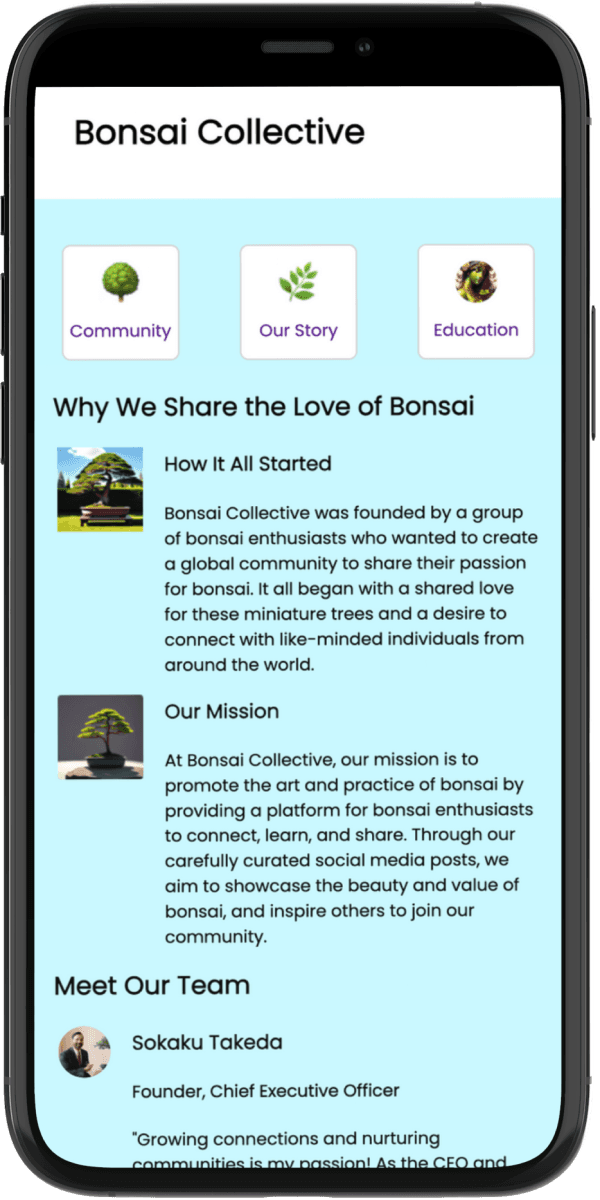
From wireframe to product, coding by hand.

From wireframe to product, coding by hand.

  • As a designer, I have great respect for the dev team and when the magic goes from concept to reality.

  • I took the initial design into code, working in HTML, CSS, and JavaScript.

  • Learning Github and VS code gave me a new appreciation for the nuances of FE development.

  • As a designer, I have great respect for the dev team and when the magic goes from concept to reality.

  • I took the initial design into code, working in HTML, CSS, and JavaScript.

  • Learning Github and VS code gave me a new appreciation for the nuances of FE development.

User testing

User testing

Methodology:

Methodology:

  • 4 users, between the ages of 30 and 71, from North America.

  • All were mid-to upper middle income.

  • All having disposable income and time to devote to a hobby like Bonsai growing.

  • Subjects were given 3 tasks, and told to think aloud.

  • 4 users, between the ages of 30 and 71, from North America.

  • All were mid-to upper middle income.

  • All having disposable income and time to devote to a hobby like Bonsai growing.

  • Subjects were given 3 tasks, and told to think aloud.

Test results:

Test results:

  • UI seems clear and pleasant.

  • Participants (50%) reported confusion about what the signup was for.

  • 1 user was unsure about the value proposition of the product.

  • Participants were split between looking for the information about the product in either "Our story" pages or "Meet the team" pages.

  • Participants had a 100% success rate in onboarding.

  • 3/4 expected confirmation of completion of onboarding flow.

  • UI seems clear and pleasant.

  • Participants (50%) reported confusion about what the signup was for.

  • 1 user was unsure about the value proposition of the product.

  • Participants were split between looking for the information about the product in either "Our story" pages or "Meet the team" pages.

  • Participants had a 100% success rate in onboarding.

  • 3/4 expected confirmation of completion of onboarding flow.

Final UI

Data-informed design changes:

Data-informed design changes:

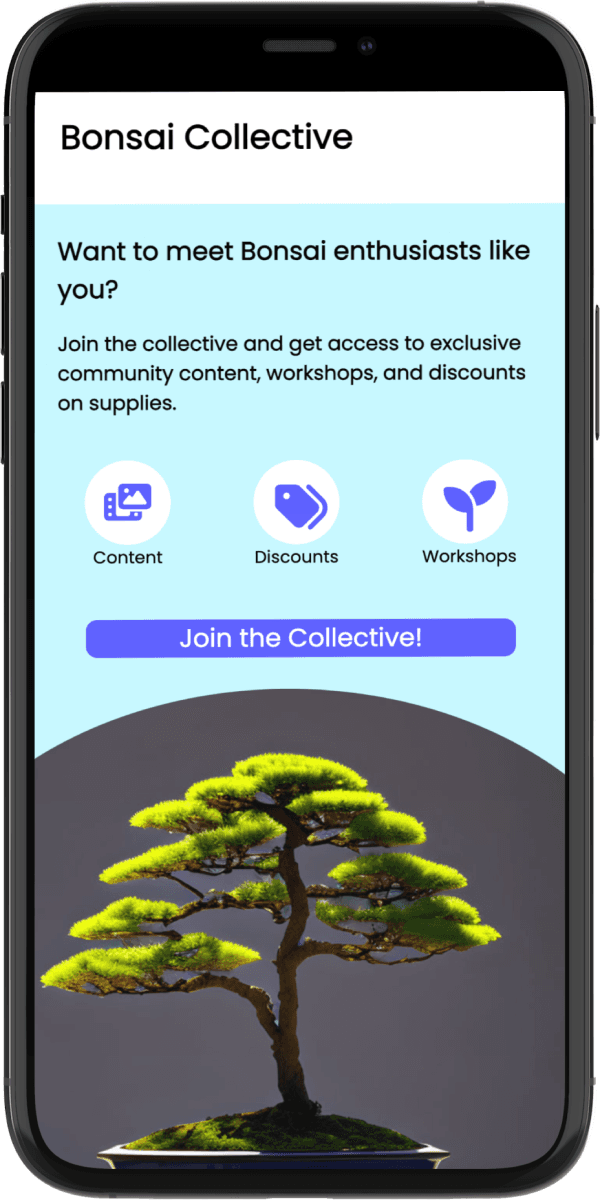
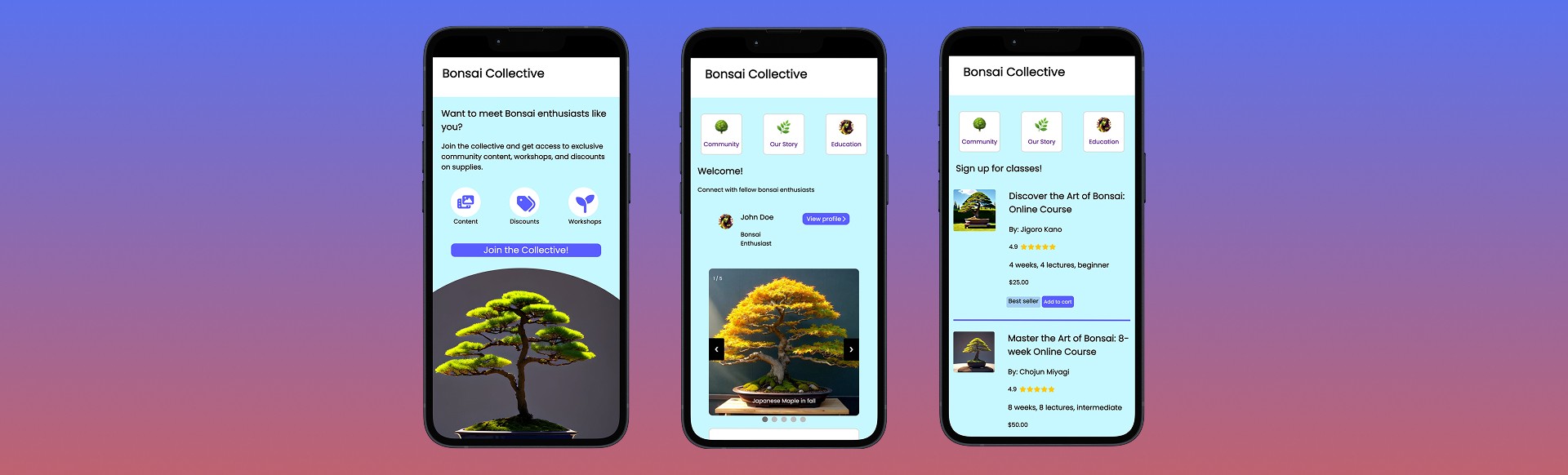
  • Added a dedicated CTA page to clarify the value proposition.

  • Reformatted the layout for better mobile-first design.

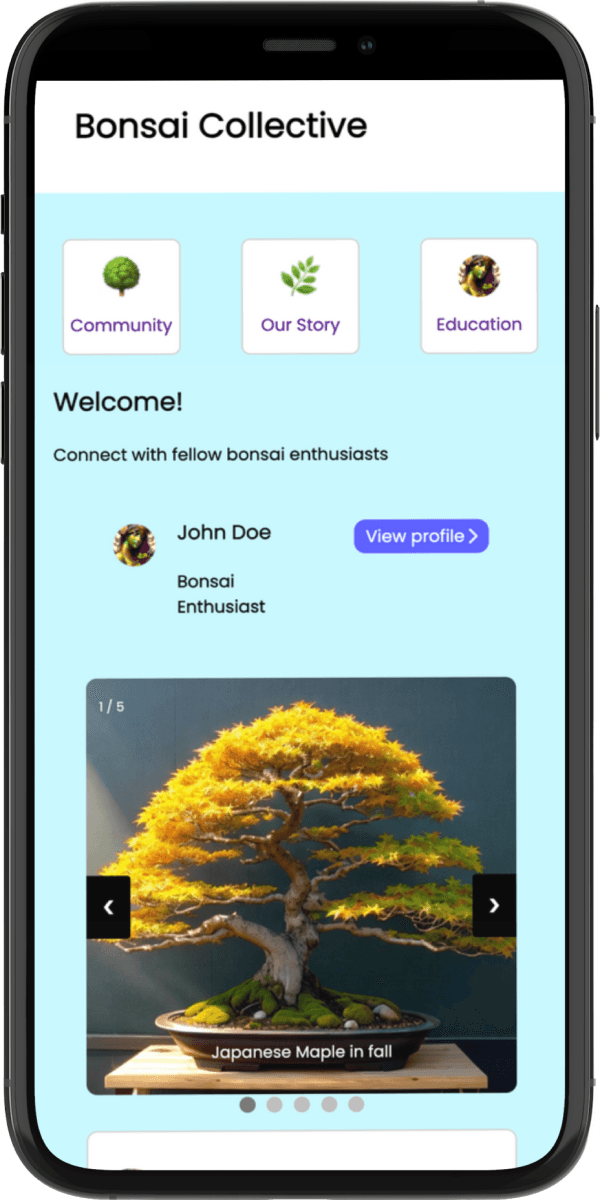
  • Combined the "Our story" page with the "Meet the team" for better intuitiveness.

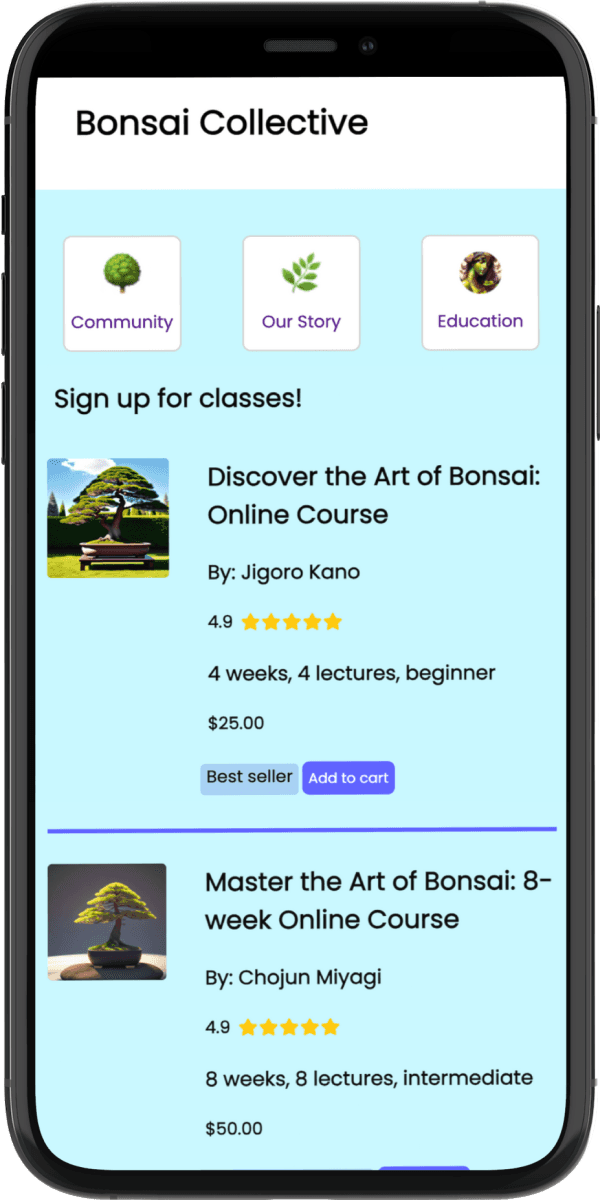
  • Based on competitive analysis, I added an "Education" page to strengthen the business case.

  • Added a dedicated CTA page to clarify the value proposition.

  • Reformatted the layout for better mobile-first design.

  • Combined the "Our story" page with the "Meet the team" for better intuitiveness.

  • Based on competitive analysis, I added an "Education" page to strengthen the business case.

Reflections:

This project showed me just how much AI can help with first-pass concepting, as well as the limitations of using AI to create the entire design. Through the initial design two pages were created that user testing revealed should be combined.

I also learned firsthand the complexities and power of responsive web implementation. I also learned more terminology specific to developers such as pull request, commits, and amends. The JavaScript interactions were particularly interesting, as well as the tradeoffs inherent in using flexbox for CSS styling and layout control.

I've been able to take this new perspective and knowledge into future positions in-house, as well as when working with Wix and Framer for freelance projects.

Justin Penney

Services

Strategic product design

Growth web design

Justin Penney

Services

Strategic product design

Growth web design

Justin Penney

Services

Strategic product design

Growth web design

Connect on LinkedIn